Egg Emoticon Font: A Creative Tool for Crafters and Designers
It happens more often than you might expect. You have a vinyl cutting machine ready, a project idea swirling in your mind, and a vision for something playful yet polished. You open your design software, scroll through your font library, and realize nothing quite captures the whimsical, food-themed charm you are after. That is the moment you start searching for something different. The Egg Emoticon Font bundle is exactly the kind of resource that fills that gap. It is not just another typeface. It is a pair of specialized dingbat fonts designed to bring egg and yolk imagery into your work with ease and precision. Whether you are a seasoned crafter or a business owner looking to add personality to your branding, this bundle offers a fresh way to express creativity.
What Makes the Egg Emoticon Bundle Unique?
At its core, this bundle is built around two distinct dingbat fonts. Each font contains multiple glyphs, giving you a library of ready-to-use icons rather than standard letters and numbers. Unlike typical emoji sets that require copying and pasting from a separate menu, these glyphs are mapped to your keyboard. Type a specific letter, and an egg or yolk appears. This seamless integration into design software makes the Egg Emoticon Font a practical tool for anyone who works with text and graphics regularly.
The Egg Emoticon Font
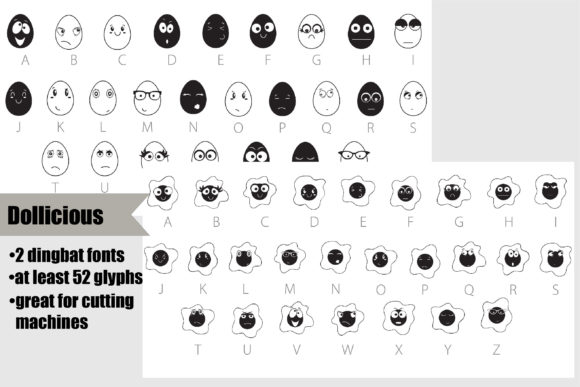
The first font in the bundle focuses on whole eggs. You will find variations in style, posture, and expression. Some eggs are simple and clean, perfect for minimal designs. Others carry a playful attitude with faces or decorative details. Because the glyphs are designed as vector paths, they scale cleanly without losing quality. This makes them ideal for large vinyl decals as well as small stickers. The consistency in stroke weight and shape ensures that each icon feels cohesive when used together in a single project.
The Yolk Emoticon Font
The second font shifts the focus to yolks. These glyphs emphasize the rich, golden center of an egg. Some yolks stand alone, while others incorporate subtle cracks or drips that suggest movement. The yolk emoticon font offers a complementary set of icons that pair naturally with the whole egg glyphs. When you combine both fonts in a design, you create visual contrast between the rounded white shells and the bright yellow interiors. This pairing opens up possibilities for layered decals, sequential designs, and storytelling through food imagery.
Why Creators Are Turning to Dingbat Fonts for Vinyl Projects
Vinyl cutting machines have changed the way small business owners and hobbyists approach design. You can cut intricate shapes from adhesive vinyl, heat transfer material, or stencil film. However, creating original artwork for every project takes time. That is where a well-made dingbat font becomes invaluable. Instead of drawing each egg from scratch, you type a character, size it, and send it to the cutter. The Egg Emoticon Font is specifically crafted with cutting machines in mind. The glyphs avoid overly thin lines that might tear during weeding, and the closed paths make it easier to remove excess vinyl.
For anyone who produces custom tumblers, apparel, signs, or scrapbook layouts, this efficiency matters. You can prototype a design in minutes, test different arrangements of eggs and yolks, and commit to a layout without spending hours on illustration. The bundle also works well with software like Silhouette Studio, Cricut Design Space, and Adobe Illustrator. Because the fonts are installed at the system level, they appear in your font dropdown menu just like any other typeface.
Real-World Applications and Scenarios
To understand the practical value of this bundle, consider a few realistic use cases. A bakery owner might want to label pastry boxes with a playful egg motif. Using the Egg Emoticon Font, they can type a row of egg glyphs across the top of a label, then add a yolk icon next to the ingredient list. The consistency of the vector artwork ensures the print looks professional, even on small scales.
A wedding planner organizing a brunch-themed reception could use these glyphs on welcome signs, table numbers, and menu cards. The egg and yolk icons provide a subtle nod to the breakfast theme without overwhelming the typography. Because the bundle includes multiple glyphs, you can vary the icons across different pieces while maintaining a unified visual language.
Teachers and homeschool parents also find value in dingbat fonts like this one. Creating worksheets, reward charts, or classroom decorations with food themes becomes straightforward. Type a series of yolk icons for a counting exercise, or use egg shapes as borders on a spring-themed bulletin board. The yolk emoticon font adds a warm, inviting feel to educational materials that might otherwise feel generic.
For online sellers on Etsy or Shopify, product photography and mockups benefit from these icons as well. You can create digital files that customers download and use at home. SVG and PNG conversion from the font is simple, and the vector nature of the glyphs means buyers can resize them without pixelation. This makes the Egg Emoticon Font a potential asset for digital product creation.
Strengths and Considerations
No tool is perfect for every situation. Understanding the strengths of this bundle helps you decide if it fits your workflow. At the same time, knowing its limitations prevents frustration later.
Strengths
- Vector quality: The glyphs are crisp at any size, from a tiny earring design to a large wall decal.
- Weeding-friendly: The shapes are designed with cutting machines in mind, reducing the risk of tearing during vinyl removal.
- Two complementary fonts: Having both egg and yolk sets gives you more creative flexibility than a single dingbat font would.
- Multiple glyphs per font: You are not limited to one or two icons. Each font offers variety, so projects stay fresh.
- Easy installation: Like standard fonts, these install in seconds and work across most design programs.
Considerations
- No traditional characters: These are dingbat fonts, not standard text fonts. You cannot type sentences with them. They are purely icon sets.
- Limited color control within the font: The glyphs are single-color vector outlines. To add color variation, you must use your software's fill and stroke tools or layer multiple copies.
- Learning the glyph map: You will need to reference the character map to know which key produces which icon. This is common with dingbat fonts but takes a moment to learn.
- Niche subject: If your projects rarely involve food or whimsical motifs, this bundle may not see heavy use. It excels in its niche but is not a general-purpose font.
Who Benefits Most from the Egg Emoticon Font Bundle?
Different audiences will find different types of value in this resource. Vinyl crafters who produce custom decals, shirts, and home decor items will appreciate the time savings and design consistency. Small business owners in the food, party, or wedding industries can use the icons to strengthen their brand identity. Graphic designers working on packaging or promotional materials get a ready-made set of illustrations that require no additional licensing. Teachers and content creators who design worksheets, printables, or digital assets can inject personality into their work without needing advanced drawing skills.
Even hobbyists who craft for personal enjoyment benefit. A planner enthusiast might use the yolk icons as stickers for a breakfast-themed weekly spread. A parent making birthday party decorations can print egg-shaped cutouts for a spring celebration. The accessibility of the Egg Emoticon Font means you do not need design training to produce appealing results.
Tips for Getting the Most Out of Your Dingbat Fonts
Once you have installed the bundle, a few simple strategies can help you maximize its potential. First, open your design software's character map or glyph panel. This shows you every icon available in both fonts. Take a screenshot or save a reference file so you can quickly locate the glyph you need without guessing.
Second, experiment with layering. Because the egg and yolk glyphs are separate, you can place a yolk on top of an egg outline to create a cutaway effect. Use different colors for each layer, and adjust the size slightly to make the yolk fit naturally inside the egg white. This technique produces a polished, multidimensional look that works beautifully on vinyl decals.
Third, consider using the fonts in combination with traditional typefaces. Pair an egg glyph with a clean sans-serif font for a modern, approachable logo. The contrast between the playful icon and the serious text creates visual interest. For a more decorative feel, try a handwritten font alongside the yolk glyphs. The mix of organic letterforms and crisp icons feels cohesive and intentional.
Fourth, test your designs on different materials before committing to a large production run. Vinyl types differ in texture and thickness. What looks perfect on paper might behave differently on a glitter vinyl or a fabric transfer. Cut a small sample with your machine first. Adjust the size and placement of the yolk emoticon font glyphs as needed. This trial saves material and time.
Finally, share your work within crafting communities. Other users of the Egg Emoticon Font may have discovered clever techniques or unexpected applications. Engaging with fellow creators helps you see the font in new ways and keeps your projects evolving.
The value of a specialized tool like this bundle lies not in its novelty but in its reliability. When you need an egg icon that looks professional, scales cleanly, and cuts well on vinyl, you want a font that delivers every time. The Egg Emoticon Font meets that need with two thoughtfully crafted sets of glyphs. Whether you are building a brand around brunch, creating classroom materials, or simply enjoying a weekend craft project, these fonts give you a solid foundation. They let you focus on the fun part of design: arranging, coloring, and sharing your vision with others.