Dollicious Font: A Playful Dingbat Duo for Creators and Crafters
If you work with vinyl cutting machines or digital design tools, you know the value of a versatile dingbat font. The right set can turn a simple project into something memorable. That’s exactly where Dollicious Font comes in. This bundle offers two distinct dingbat fonts, each designed with a whimsical, food-loving theme. One features adorable dolls interacting with their favorite treats, while the other focuses on the foods themselves, giving you plenty of glyphs to mix, match, and scale. Whether you’re a hobbyist selling at weekend markets or a business owner building a cohesive brand, these fonts open up a world of creative possibilities without requiring you to master complex illustration software.
What Makes the Dollicious Bundle Stand Out
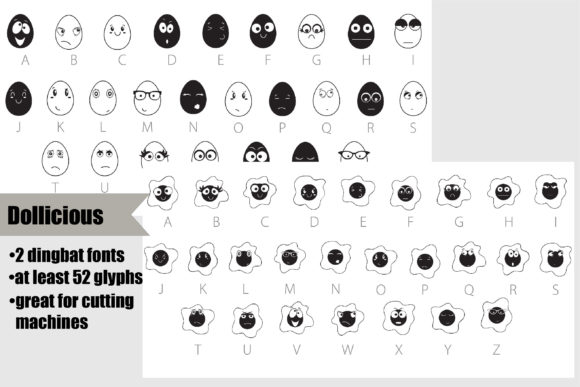
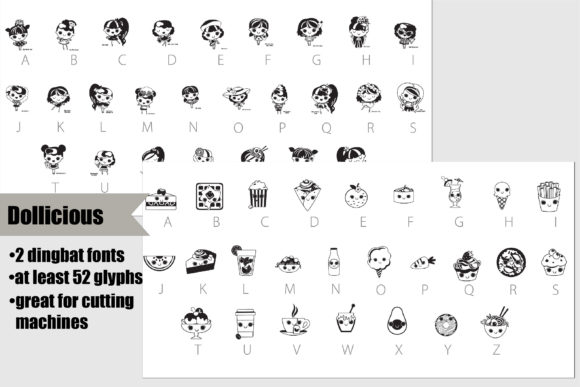
Not all dingbat fonts are created equal. Some offer only a handful of usable icons, while others lack the detail needed for clean cuts on materials like heat transfer vinyl or adhesive vinyl. Dollicious Font avoids both pitfalls. Each glyph in the bundle is carefully crafted with clean lines and distinct shapes, making it ideal for cutting machines, sublimation printing, and digital layering. The first font in the set centers on charming doll characters, each paired with a food item—think a little doll holding a cupcake, a slice of pizza, or an ice cream cone. The second font builds on that theme by focusing on the foods themselves, with detailed icons of burgers, donuts, tacos, and more. This two-font structure gives you flexibility: use the dolls for character-driven designs, or rely on the food icons alone for patterns, labels, and accents.
Another strength lies in the sheer number of glyphs included. Instead of a bare-bones selection, you get multiple variations for many of the food items and poses. This variety matters when you’re producing a series of products—like a set of themed stickers or a collection of shirts for a food truck event—because you can rotate through different icons without repeating the same image. For anyone who values efficiency and originality, that’s a practical advantage.
Vinyl Cutting and Crafting
Let’s start with the most obvious use case: vinyl cutting. If you own a cutting machine like a Cricut or Silhouette, Dollicious Font is ready to import and size. The clean outlines of the dolls and food icons mean less weeding time and fewer torn pieces, especially when you’re working with small details. You can use the doll glyphs to create custom decals for water bottles, laptops, or tumblers. Pair a doll holding a smoothie bowl with a “Good Vibes Only” caption, and you have a product that feels curated, not generic. The food icons work just as well on their own, forming repeat patterns for notebook covers, gift tags, or even wall decals for a playful kitchen or café space.
For those who sell physical products, this efficiency translates directly into faster production. You can design multiple items in one sitting, scale each glyph to fit different surfaces, and maintain a consistent look across your shop. The fact that both fonts support multiple glyphs also means you can offer customers variety without designing each piece from scratch.
Digital Design and Branding
Dollicious Font isn’t limited to physical materials. In the digital space, these dingbats serve as ready-made assets for social media graphics, website headers, and email newsletters. Suppose you run a food blog or a bakery’s Instagram account. Using one of the doll-and-food glyphs as a profile image or a recurring watermark gives your page a recognizable character. The food icons themselves can punctuate bullet points, highlight menu items, or act as dividers between sections of a recipe post. This kind of visual consistency supports brand recognition without requiring a custom illustration budget.
Small business owners and entrepreneurs will appreciate how easily the font integrates with tools like Canva, Adobe Illustrator, or Affinity Designer. Because it’s a true font file (OTF or TTF), you can type a letter to produce a specific glyph, then recolor or resize it just like any other text element. That’s a faster workflow than importing individual PNGs or SVGs, especially when you’re iterating on layouts or testing color schemes.
Educational and Classroom Materials
Teachers, homeschool parents, and educators can also put Dollicious Font to work. The playful food characters make excellent visuals for worksheets, reward charts, and classroom decor. For example, you could create a “Lunch Count” board where students move a doll glyph next to their chosen meal icon. Or design a simple matching game: print the food icons, laminate them, and have children pair each doll with the correct treat. The rounded, friendly aesthetic appeals to young learners and helps make routine tasks feel more engaging. Because the glyphs are vector-based, you can enlarge them for bulletin boards without losing resolution.
Party Planning and Event Decor
Event planners and party hosts will find these fonts useful for banners, cupcake toppers, and favor tags. Host a birthday party with a “foodie” theme, and you can quickly print a banner using the doll glyphs, then use the food icons as accents on treat bags. For a food truck event or a community potluck, the glyphs add a cohesive, celebratory feel to signage and menus. The scalability of the font means you can create both small stickers for place cards and large posters for the dessert table with the same file.
Usability and Workflow Benefits
One of the quieter but significant benefits of Dollicious Font is how it streamlines your design process. Instead of searching through stock photo libraries or creating illustrations from scratch, you open your font menu, type a character, and the image appears. For busy creators juggling multiple projects, that time savings adds up. The font also works across operating systems and software that support OpenType features, so you can move between a home computer and a work laptop without compatibility headaches.
Another practical consideration: because the bundle includes two complementary fonts, you can layer them for added depth. Place a food icon behind a doll glyph to create a scene, or alternate between the two sets in a repeating pattern. This layering effect works especially well in sublimation printing, where you can merge colors and gradients behind the line art. If you’re new to layering, start simple: use a solid background shape, then overlay a doll glyph in white or a contrasting color. The clean outlines prevent muddiness, even when you experiment with multiple layers.
Realistic Examples to Inspire Your Own Projects
- Custom stickers for a local bakery: Print a sheet of doll-and-food glyphs on removable vinyl, then offer them as freebies with every purchase. Customers stick them on laptops, water bottles, or lunchboxes, giving your bakery ongoing visibility.
- A t-shirt line for a food festival: Use the food icons alone in a repeating grid pattern across the shirt, with the event name in a clean sans-serif. The icons read clearly at a distance and reinforce the culinary theme.
- Digital planners and journal templates: Insert a doll glyph at the start of each weekly spread, or use the food icons as trackers for water intake, meals, or mood. The playful style keeps planning feel less like a chore.
- Gift wrapping and packaging: Stamp or cut the icons onto kraft paper tags, then tie them with twine. A small doll holding a donut adds a personal touch that store-bought tags can’t match.
- Classroom seating charts: Assign each student a different doll glyph, then use the food icons to mark their preferred lunch option. The visual system helps younger children identify their spot without reading names.
What to Consider Before Buying
Before you download any font bundle, it pays to check a few practical details. First, verify that the file format is compatible with your design software and cutting machine. Most modern fonts come as OTF or TTF, which work across Windows and macOS, but some older machines require a specific format. Second, review the licensing terms. If you plan to sell products featuring the glyphs, confirm that commercial use is allowed. The Dollicious bundle typically includes a standard commercial license, but always read the fine print to avoid surprises.
Another tip: open the font’s glyph panel in your software to see the full character map. Knowing which letter corresponds to each doll or food icon saves you time during design. Some creators find it helpful to print a reference sheet and keep it near their workstation. Finally, consider how the aesthetic matches your existing projects. Dollicious Font leans cute and playful, so it’s an excellent match for youth-oriented brands, food-related businesses, and casual crafts. If your brand voice is more minimalist or corporate, you might reserve these glyphs for accent details rather than primary visuals.
Bringing It All Together
Dollicious Font offers more than just a set of cute icons. It provides a practical, time-saving resource for anyone who works with vinyl, digital design, or printed materials. The two-font structure gives you both characters and standalone food items, while the generous glyph selection keeps your projects fresh and varied. Whether you’re building a small business, teaching a classroom, or simply enjoying a creative hobby, this bundle fits naturally into your workflow. By focusing on clean lines, easy scalability, and real-world versatility, it lets you spend less time wrestling with software and more time making things you’re proud to share.