Pumpkin Font: Autumn-Inspired Color Font for Creatives
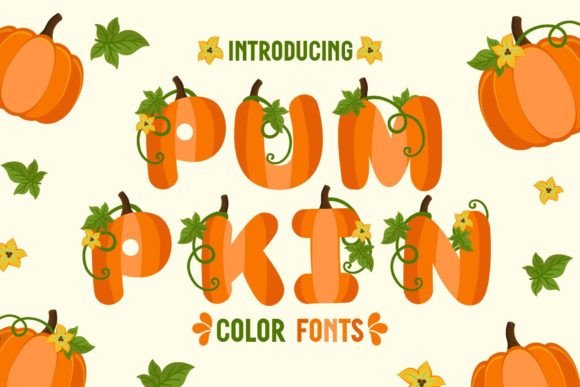
Every season brings its own visual language, and autumn speaks with warm oranges, deep browns, and muted golds. When you need a typeface that captures that feeling immediately, Pumpkin Font delivers the kind of autumnal character that plain black or gray text simply cannot. This is not a standard font. It is a color font built on the OpenType-SVG format, which means each letter comes pre-filled with rich, seasonal color. No layering, no manual gradients—just one file that renders the full autumn palette as you type.
Designed to mimic the look of carved pumpkins, fallen leaves, and cozy harvest tones, Pumpkin Font works well for anyone who needs a display typeface with immediate personality. Whether you are a freelancer creating holiday invitations or a small business owner refreshing your social media for October, this font saves time while adding genuine visual impact.
What Makes Pumpkin Font Different
Most fonts you use every day are single-color outline fonts. You choose black, or you choose red, and every letter looks the same. Pumpkin Font is a color font, specifically an OpenType-SVG font. That means the font file itself contains color information. When you type, each character appears with the warm, layered look of autumn—think sunset oranges, rustic browns, and soft yellows, all combined in one glyph.
This is not a trick achieved by layering multiple text boxes or applying effects after typing. The color is built in. For designers who work in Photoshop, Illustrator, Silhouette Studio, or Inkscape, this is remarkably efficient. You install the font, choose it from your type menu, and start typing. The color appears immediately. There is no need to apply gradients, drop shadows, or texture overlays to get that autumn feel.
One practical note: because Pumpkin Font uses the OpenType-SVG format, the standard OTF or TTF files are not compatible with Cricut Design Space. If you rely heavily on a Cricut machine for cutting vinyl or paper, you will need to check compatibility first or use an alternative workflow. The font works beautifully in Silhouette Studio, which many crafters and small business owners prefer for its native color font support.
Real-World Uses for Pumpkin Font
Because it is a display font rather than a body text font, Pumpkin Font shines at larger sizes and in applications where you want the text itself to be a focal point. Here are some of the most practical uses I have seen and recommend.
Invitations and Event Stationery
Thanksgiving dinner invitations, Halloween party invites, and autumn wedding save-the-dates all benefit from a typeface that sets the tone before anyone reads a single word. A font like Pumpkin Font does half the work for you. The color and texture communicate “fall” instantly. Pair it with a simple background—cream, kraft paper, or deep burgundy—and the letters stand out without extra ornamentation. For stationery designers, this means less time spent on illustration and more time delivering finished products to clients.
Social Media Graphics
Social media moves fast, and you only get a moment to stop a scrolling thumb. Using Pumpkin Font for headings, quotes, or call-to-action text in Instagram posts, Pinterest pins, or Facebook banners gives you an edge in engagement. The warm tones catch the eye naturally. I have seen small shops use this font for autumn sale announcements and see notably higher click-through rates compared to their usual sans-serif posts. The font does the work of creating seasonal visual appeal without requiring advanced design skills.
Greeting Cards and Handmade Crafts
If you sell on Etsy or at local markets, greeting cards are a staple category. A card that reads “Happy Thanksgiving” or “Warmest Wishes” in Pumpkin Font feels thoughtful and cohesive. The same applies to gift tags, place cards, and thank-you notes. Because the font renders in color, you can print directly onto cardstock and have a finished product with no additional embellishment. For crafters who work in Silhouette Studio, you can also use the font to create cut files for vinyl decals or stencils.
Blog and Website Headers
Bloggers and educators often need seasonal headers for their sites or course materials. A title like “Your Fall Bucket List” or “October Lesson Plans” typed in Pumpkin Font adds visual warmth that draws readers in. Because it is a color font, you do not need to export an image with text already embedded. You can use it as live text on your site if your platform supports OpenType-SVG rendering—or you can take a screenshot or export from Photoshop for static headers. Either way, you save time and keep your branding consistent.
Who Benefits Most from This Font
- Graphic designers and freelancers working on seasonal campaigns, invitations, or branding projects. The font reduces production time because the color is already there.
- Small business owners and entrepreneurs who handle their own marketing. You can create polished autumn content for social media, email headers, and promotional materials without hiring a designer.
- Educators and bloggers looking for visually engaging materials for fall-themed lessons, newsletters, or website headers. The font adds personality to otherwise plain text.
- Hobbyists and crafters who make handmade cards, gift tags, or wall art. Pumpkin Font gives projects a professional finish with minimal effort.
Practical Considerations When Using Pumpkin Font
Color fonts are still relatively new in the design world, and they do not behave exactly like traditional fonts. Here are a few things to keep in mind to get the best results.
Software Compatibility
As mentioned, Pumpkin Font works natively in Photoshop, Illustrator, Silhouette Studio, and Inkscape. If you use Affinity Designer, CorelDRAW, or other design tools, check for OpenType-SVG support before purchasing. Some older software versions may render the font as black or monochrome. Always test the font in your specific environment if you are unsure.
File Formats
The font comes with OTF and/or TTF files for standard use, but the color functionality relies on the SVG table within those files. If you open the OTF or TTF in a program that does not read the SVG data, you will see only a regular black outline version. That is why compatibility matters. The font is not broken—it is just that your software needs to support SVG color fonts.
Best Practices for Sizing and Pairing
Because this is a highly textured display font, use it at larger sizes—generally 24 points and above. At very small sizes, the detail and color variation may become muddy or hard to read. Pair Pumpkin Font with a clean, simple sans-serif or serif body font for contrast. A neutral background also helps the colors pop. Avoid busy backgrounds that compete with the font’s built-in texture.
How Pumpkin Font Enhances Communication
Typography does more than convey words. It conveys mood, season, and intention. When you use Pumpkin Font, you signal “autumn” to your audience before they even parse the message. For a Thanksgiving invitation, that immediate recognition builds anticipation and emotional resonance. For a Halloween sale post, it creates a sense of fun and urgency. The font acts as a visual shortcut, which is valuable in a world where people skim rather than read.
From a branding perspective, using a distinctive seasonal font like this one also helps your materials stand out. In a feed full of generic Helvetica headers, a warm, orange-toned word instantly breaks the pattern. That visual break often translates into longer engagement, more clicks, or a stronger emotional connection to your content.
A Word on Licensing and Usage
Before using any font commercially, check the license terms. Most font shops offer standard licenses for personal and small business use, with extended licenses for larger corporate applications or resale of digital products. Pumpkin Font is typically sold through platforms that provide clear licensing. When in doubt, opt for the license that matches your actual use case—overspending on an extended license you do not need is wasteful, but underspending and violating terms is worse.
Final Thoughts on Choosing Pumpkin Font
Selecting a color font is a decision about efficiency as much as aesthetics. Pumpkin Font gives you a finished look in a single step. For creatives who work through the autumn season—whether for client projects, personal craft sales, or content creation—that time savings is real. You are not just buying a font. You are buying a shortcut to a polished seasonal aesthetic.
If you regularly find yourself adding gradient overlays, texture layers, or manual color tweaks to fall-themed text, this font removes that entire step. Try it on an invitation or a social post, and you will likely notice how much faster the work goes. And if you ever need guidance on using OpenType-SVG fonts in your specific software, the Ultimate Font Guide is a reliable resource to keep bookmarked.